
 Exclusive Deals
 Support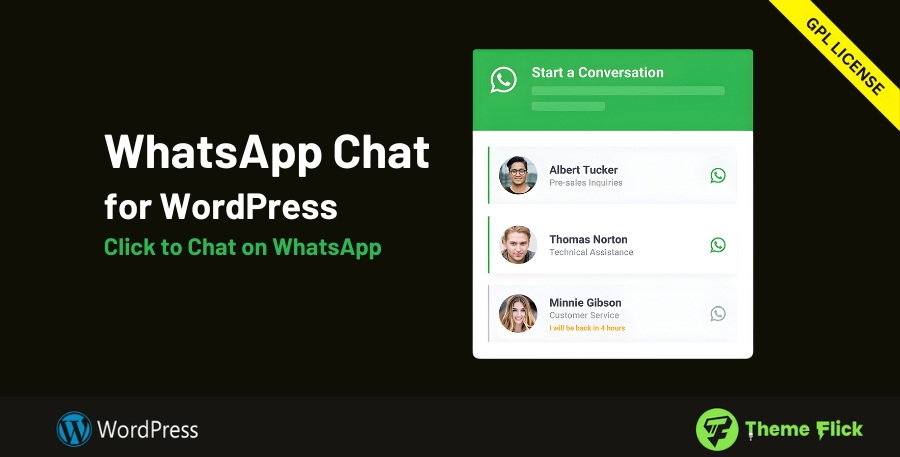





-
Connect & Convert, Instantly
Place a WhatsApp chat button or floating widget on any page so visitors can message your team in one tap. Reduce friction at checkout, answer pre-sale questions faster, and turn browsing into conversations that convert. -
Multi-Agent, Human-First Support
List multiple team members in a single chat box. Show names, photos, and roles so customers know who they’re messaging. Route questions to sales, billing, or tech—right from the widget. -
Smart Availability & Personalization
Set working hours per agent and auto-switch the widget style when offline (e.g., greyed out). Customize colors, greetings, and labels to match your brand while clearly communicating response times. -
Everywhere You Need It (Shortcodes + WooCommerce)
Drop in a chat button with a shortcode on specific pages, posts, or landing funnels. Optionally display a WhatsApp button beneath the WooCommerce “Add to cart” to rescue hesitating buyers. -
Mobile & Desktop Ready
On phones, chats open in the WhatsApp app; on desktops, they launch WhatsApp Web—no extra steps for the user. The widget is lightweight and responsive for smooth UX on any device. -
Global & Multilingual
Translate the widget text with your favorite translation plugin and run region-specific variations as needed. Great for multilingual stores or country-targeted campaigns. -
No-Code Setup
Install, activate, add your team numbers or group links, and publish. Fine-tune colors, messages, schedules, and placement—all from a clean settings panel.
FAQs
Q1: Can I add multiple WhatsApp numbers?
Yes. Add as many agents as you like and display them in a single selector so visitors can choose who to message.
Q2: Will it work with WooCommerce?
Yes. You can place a WhatsApp button under the “Add to cart” area and on checkout/help pages.
Q3: How do I show different availability per agent?
Set working hours for each profile. The widget reflects online/offline status automatically and can change color or message accordingly.
Q4: Can I show the chat only on certain pages?
Yes. Use the built-in shortcode for precise placement or apply page-level display rules.
Q5: Is any coding required?
No. All customization—colors, copy, agents, schedules, and placement—is handled via the WordPress dashboard.
Q6: Does it support translations?
Yes. It works with popular translation plugins to localize labels, prompts, and agent info.




Reviews
There are no reviews yet.